 matosic

Cenit
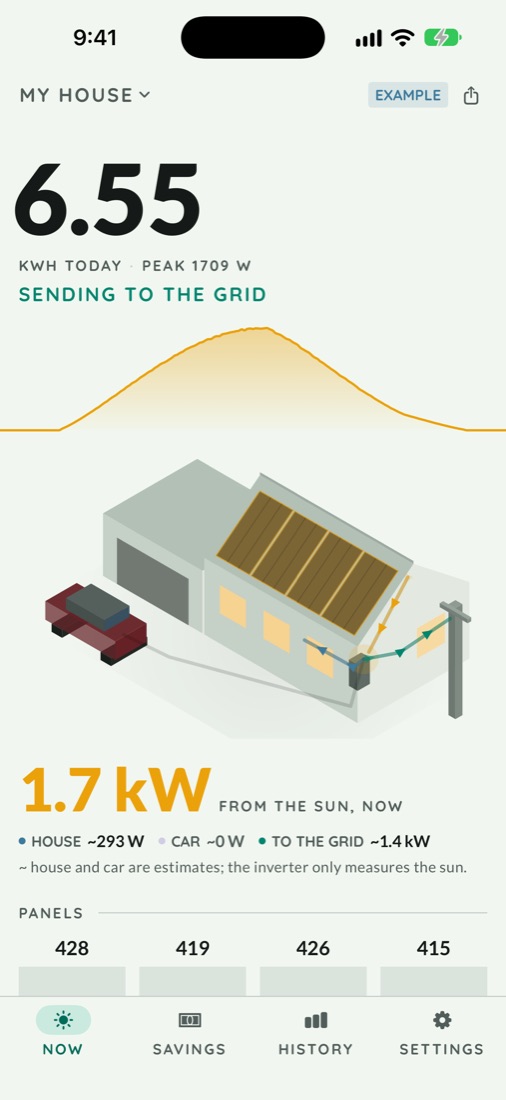
iPhone & iPad · free for a homeA solar panel monitor for iPhone and iPad. Works with NEP, Hoymiles, APsystems, Enphase, SolarEdge, Growatt, Huawei, Felicity Solar, Fronius, Solis, GoodWe, Victron, Sungrow and Solarman inverters, and eGauge meters.
Download on the App StoreCenit signs in to your inverter's cloud with your own login and keeps what it reads on your phone. You don't make an account with me, and up to 3 plants are free for good. If your inverter reports each panel, you'll know whether they all dropped together (dust, time to wash them) or just one did.
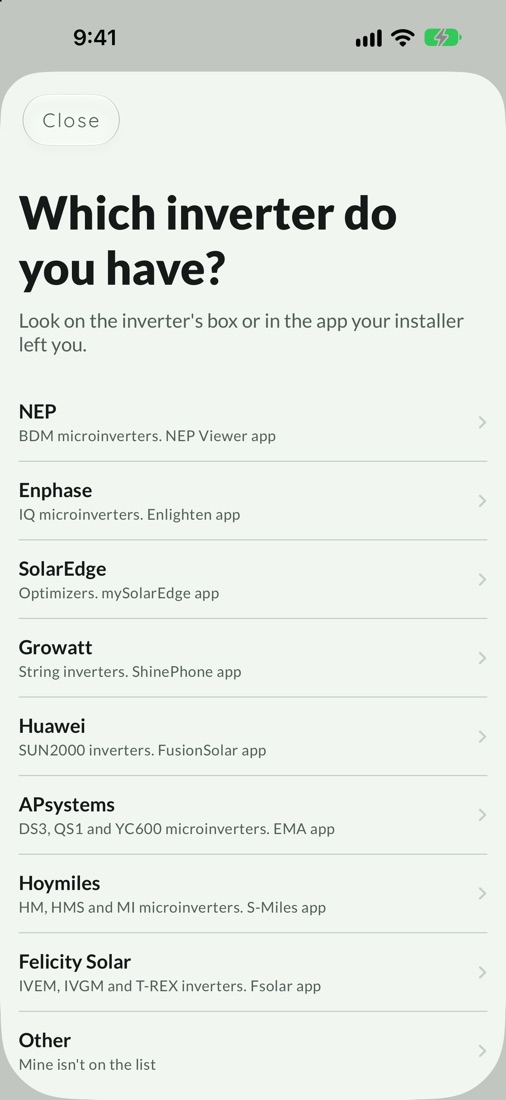
Which inverters it works with
-
NEP BDM microinverters
Sign in with the same email and password as the NEP Viewer app. Your installer almost always made that account on nepviewer.net, so ask them if you don't have it.
Panel by panel
-
Hoymiles HM, HMS and MI microinverters
Sign in with your S-Miles login. Your panels have to show up in S-Miles already, through a DTU or microinverters with Wi-Fi built in.
Panel by panel
-
APsystems DS3, QS1 and YC600 microinverters
Needs an ECU (ECU-B, ECU-R or ECU-C) sending data to EMA. Connect with your EMA login, with EMA's visitor link (no password), or with API keys from APsystems.
Panel by panel, if your installer drew the panel map in EMA
-
Enphase IQ microinverters
Register a free app at developer-v4.enphase.com, paste its keys, and approve your own system. The app walks you through it.
Whole system
-
SolarEdge inverters with optimizers
Generate an API key in the SolarEdge monitoring portal (Admin → Site Access → API Access) and paste it with your Site ID.
Whole system
-
Growatt string inverters
Sign in with the same username and password as the ShinePhone app.
Whole plant
-
Huawei SUN2000 inverters
Paste your FusionSolar kiosk link. There's no password to type. History in Cenit starts the day you connect.
Whole plant
-
Felicity Solar IVEM, IVGM and T-REX inverters
Sign in with the same email and password as the Fsolar app. Your inverter has to show up in Fsolar already, through Felicity's Wi-Fi module.
Whole plant
-
Fronius Symo, Primo and GEN24 inverters
Sign in with the same email and password as solarweb.com or the Solar.web app. Your inverter has to show up in Solar.web already, through its datalogger.
Whole plant
-
Solis string inverters
Sign in with the same email and password as the SolisCloud app. If your installer set it up, ask them for it.
Whole plant
-
GoodWe string inverters
Sign in with the same email and password as the SEMS Portal or SEMS+ app. If your installer set it up, ask them for it.
Whole plant
-
Victron MultiPlus, Quattro and SmartSolar
Sign in with your VRM email and password. If VRM asks for a code as well, paste an access token from VRM instead.
Whole system
-
Sungrow SG and SH inverters
Sign in with the same account and password as the iSolarCloud app. For now it only works with accounts from the Americas, Asia and Africa.
Whole plant
-
Solarman Deye, Sofar and others
Sign in with the same email and password as the SOLARMAN Smart app. It's the cloud behind Deye, Sofar and a lot of other inverters that report through a Solarman Wi-Fi stick.
Whole plant
-
eGauge energy meter
Paste your meter's link, something like egauge12345.egaug.es. It has to open without a password. Your last year shows up as soon as you connect, because the meter keeps its own history.
Whole system
Are you an installer? Here is how you see every client's plant in one app.
What it shows you
Which panel, or all of them
When production drops, you want to know whether the panels are dirty or something broke. If they all drop together, it's dust. If only one drops, it's that panel, and Cenit shows you which one on a drawing of your roof.
Today, hour by hour
Drag your finger along today's curve to see what the panels were making at any moment. The dashed line behind it is the most they made at that time of day over the last two weeks, so a sunny day that comes in under it means something changed.
What the panels save you
Tell it what you pay per kWh and what you get for power you send to the grid, and it works out about how much the panels saved you this month and this year, in your own currency. It also shows how much of your solar you use at home.
In Mexico, your margin before DAC
Instead of savings you get how much room you've got before CFE moves you onto the DAC tariff, and you can scan your CFE bill with the camera.
Widgets and alerts
Today's numbers on your home screen, and a heads-up when a panel's been low for days or it's time to wash them.
Questions
Is there one app for NEP, Hoymiles, Huawei, Growatt, Sungrow and other brands?
That's what Cenit is. Today it works with NEP, Hoymiles, APsystems, Enphase, SolarEdge, Growatt, Huawei, Felicity Solar, Fronius, Solis, GoodWe, Victron, Sungrow, Solarman and eGauge meters, 15 brands in all. You pick your brand when you connect and the app works the same from there. What changes is the detail each brand shares. NEP, Hoymiles and APsystems report every panel, and the rest report the whole system.
How much does it cost?
Nothing for a home. Up to 3 plants are free for good, so your house, your business and a relative's roof cost you nothing. There are no ads.
Installers who watch more than 3 plants pay once or by the month, depending on how many. From 4 to 10 plants it's 9.99 USD once or 0.99 USD a month. From 11 to 49 it's 39.99 USD once or 3.99 USD a month. For 50 or more it's 74.99 USD once or 7.99 USD a month. Paying once is for good. The first month every plant is open, so you see them all working before you pay anything.
Where does my data go?
Your password is kept in the iOS Keychain and only goes to that brand's own servers. Readings stay on your phone. The app asks once whether it can send anonymous events (which brand you picked, whether it connected, and what kind of error it was if syncing fails), and works the same if you say no. The details are in the privacy policy.
Is Cenit made by one of these brands?
No. Cenit is an independent app by Hrvoje Matošić, made in Mexico, and isn't connected with any inverter maker. Some of what it reads isn't officially documented, so if a brand changes something on their side, a connection can stop working for a while.
Can I try it before I connect anything?
Yes. Open the app and look around with example data.
Is there an Android version?
It's in closed testing on Google Play. For now you can download Cenit on iPhone and iPad.
Something isn't working
Write to me at privacidad@hrvojematosic.com and tell me your inverter brand and what you see.
My inverter isn't on the list
If it's a Deye, a Sofar or another inverter with a Solarman Wi-Fi stick, connect it as Solarman. If not, write to me at privacidad@hrvojematosic.com with the brand and model, and I'll move it up the list.